Audio Playback
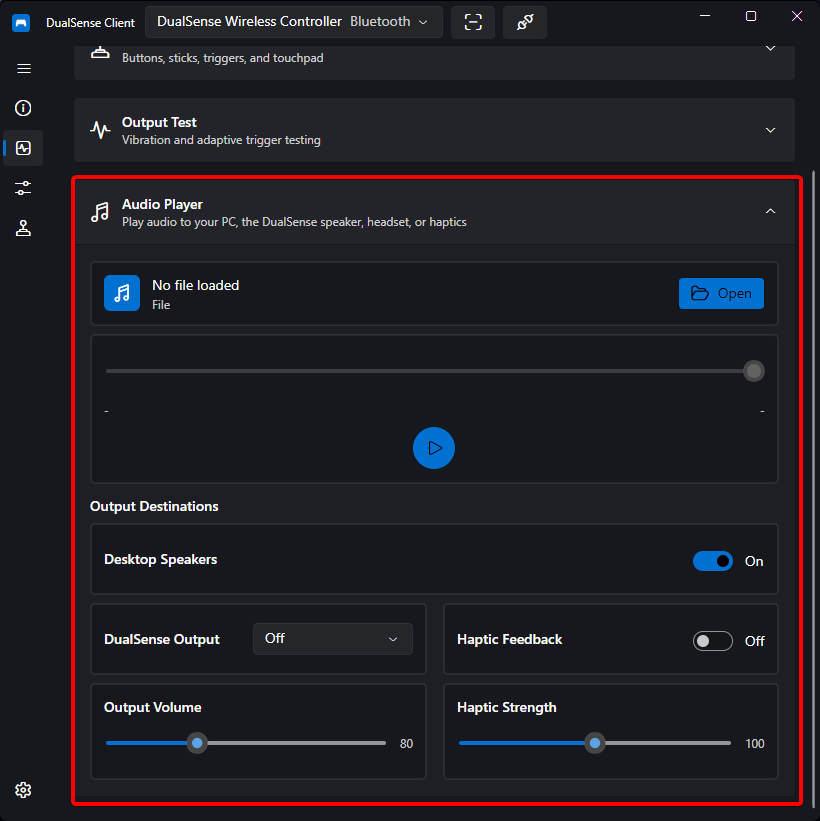
DualSense Client can play audio files to three independent destinations:
- Desktop speakers — your normal system output
- DualSense speaker — the small speaker built into the controller
- Controller haptics — audio rendered as haptic feedback inside the grips
Each destination is controlled independently, so you can send one file to the speaker while another plays through the haptics.
How It Works
- Haptic audio over Bluetooth is Opus-encoded specifically for the controller's haptic channels
- USB audio uses the controller's standard audio endpoint
Controls
- File — open an audio file (mp3, wav, flac, …) via the Open button. The file name, duration, position, and a seek bar with play/pause are shown in the transport row.
- Outputs
- Desktop Speakers toggle — when on, audio plays through the PC.
- Controller output selector —
Off,Speaker(controller's built-in speaker), orHeadset(headset jack). Speaker and headset are mutually exclusive and cannot run at the same time. - Haptic Feedback toggle — when on, the audio also drives the haptic actuators.
- Speaker Volume — 0 – 255 for the controller speaker/headset path.
- Haptic Strength — 0 – 200% for the vibration intensity when haptics are enabled.
The same player is embedded in the Input Monitor output test section, so you can audition audio without leaving that page.
Note
Haptic playback works best with sound effects and music with strong bass — the haptics are essentially two high-quality actuators, one per grip. The controller outputs are only usable when a controller is connected.